Load data using Routine Load
Try Routine Load out in this Quick Start
This topic introduces how to create a Routine Load job to stream Kafka messages (events) into StarRocks, and familiarizes you with some basic concepts about Routine Load.
To continuously load messages of a stream into StarRocks, you can store the message stream in a Kafka topic, and create a Routine Load job to consume the messages. The Routine Load job persists in StarRocks, generates a series of load tasks to consume the messages in all or part of the partitions in the topic, and loads the messages into StarRocks.
A Routine Load job supports exactly-once delivery semantics to guarantee the data loaded into StarRocks is neither lost nor duplicated.
Routine Load supports data transformation at data loading and supports data changes made by UPSERT and DELETE operations during data loading. For more information, see Transform data at loading and Change data through loading.
You can load data into StarRocks tables only as a user who has the INSERT privilege on those StarRocks tables. If you do not have the INSERT privilege, follow the instructions provided in GRANT to grant the INSERT privilege to the user that you use to connect to your StarRocks cluster. The syntax is GRANT INSERT ON TABLE <table_name> IN DATABASE <database_name> TO { ROLE <role_name> | USER <user_identity>}.
Supported data formats
Routine Load now supports consuming CSV, JSON, and Avro (supported since v3.0.1) formatted data from a Kafka cluster.
NOTE
For CSV data, take note of the following points:
- You can use a UTF-8 string, such as a comma (,), tab, or pipe (|), whose length does not exceed 50 bytes as a text delimiter.
- Null values are denoted by using
\N. For example, a data file consists of three columns, and a record from that data file holds data in the first and third columns but no data in the second column. In this situation, you need to use\Nin the second column to denote a null value. This means the record must be compiled asa,\N,binstead ofa,,b.a,,bdenotes that the second column of the record holds an empty string.
Basic concepts
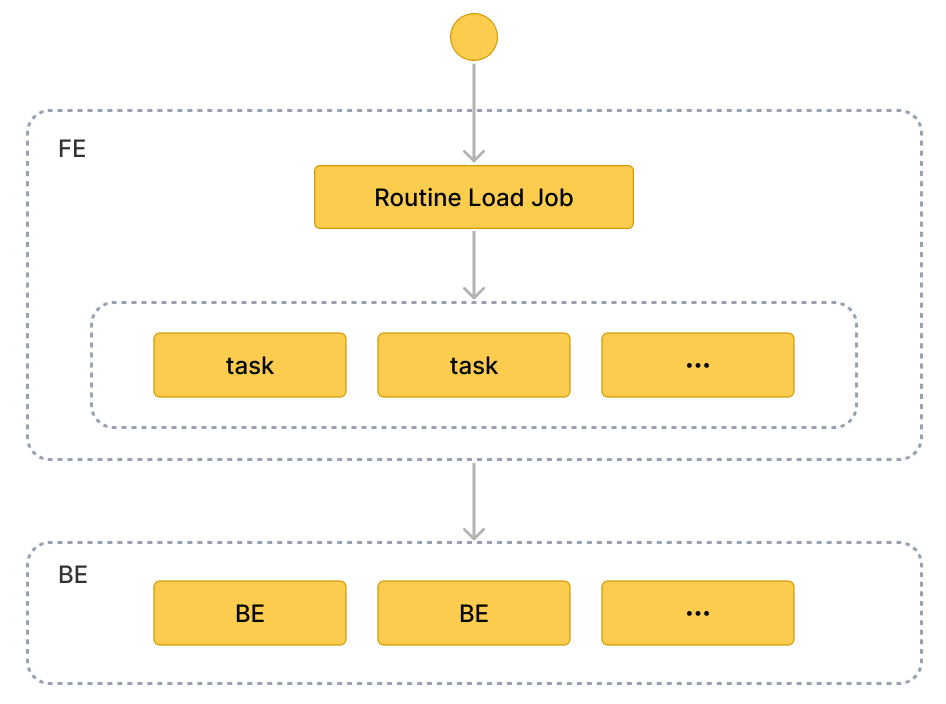
Terminology
-
Load job
A Routine Load job is a long-running job. As long as its status is RUNNING, a load job continuously generates one or multiple concurrent load tasks which consume the messages in a topic of a Kafka cluster and load the data into StarRocks.
-
Load task
A load job is split into multiple load tasks by certain rules. A load task is the basic unit of data loading. As an individual event, a load task implements the load mechanism based on Stream Load. Multiple load tasks concurrently consume the messages from different partitions of a topic, and load the data into StarRocks.
Workflow
-
Create a Routine Load job. To load data from Kafka, you need to create a Routine Load job by running the CREATE ROUTINE LOAD statement. The FE parses the statement, and creates the job according to the properties you have specified.
-
The FE splits the job into multiple load tasks.
The FE split the job into multiple load tasks based on certain rules. Each load task is an individual transaction. The splitting rules are as follows:
- The FE calculates the actual concurrent number of the load tasks according to the desired concurrent number
desired_concurrent_number, the partition number in the Kafka topic, and the number of the BE nodes that are alive. - The FE splits the job into load tasks based on the actual concurrent number calculated, and arranges the tasks in the task queue.
Each Kafka topic consists of multiple partitions. The relation between the topic partition and the load task is as follows:
- A partition is uniquely assigned to a load task, and all messages from the partition are consumed by the load task.
- A load task can consume messages from one or more partitions.
- All partitions are distributed evenly among load tasks.
- The FE calculates the actual concurrent number of the load tasks according to the desired concurrent number
-
Multiple load tasks run concurrently to consume the messages from multiple Kafka topic partitions, and load the data into StarRocks
-
The FE schedules and submits load tasks: the FE schedules the load tasks in the queue on a timely basis, and assigns them to selected Coordinator BE nodes. The interval between load tasks is defined by the configuration item
max_batch_interval. The FE distributes the load tasks evenly to all BE nodes. See CREATE ROUTINE LOAD for more information aboutmax_batch_interval. -
The Coordinator BE starts the load task, consumes messages in partitions, parses and filters the data. A load task lasts until the pre-defined amount of messages are consumed or the pre-defined time limit is reached. The message batch size and time limit are defined in the FE configurations
max_routine_load_batch_sizeandroutine_load_task_consume_second. For detailed information, see FE Configuration. The Coordinator BE then distributes the messages to the Executor BEs. The Executor BEs write the messages to disks.NOTE
StarRocks supports access to Kafka via security protocols including SASL_SSL, SAS_PLAINTEXT, SSL, and PLAINTEXT. This topic uses connecting to Kafka via PLAINTEXT as an example. If you need to connect to Kafka via other security protocols, see CREATE ROUTINE LOAD.
-
-
The FE generates new load tasks to load data continuously. After the Executor BEs has written the data to disks, the Coordinator BE reports the result of the load task to the FE. Based on the result, the FE then generates new load tasks to load the data continuously. Or the FE retries the failed tasks to make sure the data loaded into StarRocks is neither lost nor duplicated.
Create a Routine Load job
The following three examples describe how to consume CSV-format, JSON-format and Avro-format data in Kafka, and load the data into StarRocks by creating a Routine Load job. For detailed syntax and parameter descriptions, see CREATE ROUTINE LOAD.
Load CSV-format data
This section describes how to create a Routine Load job to consume CSV-format data in a Kafka cluster, and load the data into StarRocks.
Prepare a dataset
Suppose there is a CSV-format dataset in the topic ordertest1 in a Kafka cluster. Every message in the dataset includes six fields: order ID, payment date, customer name, nationality, gender, and price.
2020050802,2020-05-08,Johann Georg Faust,Deutschland,male,895
2020050802,2020-05-08,Julien Sorel,France,male,893
2020050803,2020-05-08,Dorian Grey,UK,male,1262
2020050901,2020-05-09,Anna Karenina",Russia,female,175
2020051001,2020-05-10,Tess Durbeyfield,US,female,986
2020051101,2020-05-11,Edogawa Conan,japan,male,8924
Create a table
According to the fields of CSV-format data, create the table example_tbl1 in the database example_db. The following example creates a table with 5 fields excluding the field of customer gender in the CSV-format data.
CREATE TABLE example_db.example_tbl1 (
    `order_id` bigint NOT NULL COMMENT "Order ID",
    `pay_dt` date NOT NULL COMMENT "Payment date",
    `customer_name` varchar(26) NULL COMMENT "Customer name",
    `nationality` varchar(26) NULL COMMENT "Nationality",
    `price`double NULL COMMENT "Price"
)
ENGINE=OLAP
DUPLICATE KEY (order_id,pay_dt)
DISTRIBUTED BY HASH(`order_id`);
NOTICE
Since v2.5.7, StarRocks can automatically set the number of buckets (BUCKETS) when you create a table or add a partition. You no longer need to manually set the number of buckets. For detailed information, see set the number of buckets.
Submit a Routine Load job
Execute the following statement to submit a Routine Load job named example_tbl1_ordertest1 to consume the messages in the topic ordertest1 and load the data into the table example_tbl1. The load task consumes the messages from the initial offset in the specified partitions of the topic.
CREATE ROUTINE LOAD example_db.example_tbl1_ordertest1 ON example_tbl1
COLUMNS TERMINATED BY ",",
COLUMNS (order_id, pay_dt, customer_name, nationality, temp_gender, price)
PROPERTIES
(
    "desired_concurrent_number" = "5"
)
FROM KAFKA
(
    "kafka_broker_list" = "<kafka_broker1_ip>:<kafka_broker1_port>,<kafka_broker2_ip>:<kafka_broker2_port>",
    "kafka_topic" = "ordertest1",
    "kafka_partitions" = "0,1,2,3,4",
    "property.kafka_default_offsets" = "OFFSET_BEGINNING"
);
After submitting the load job, you can execute the SHOW ROUTINE LOAD statement to check the status of the load job.
-
load job name
There could be multiple load job on a table. Therefore, we recommend you name a load job with the corresponding Kafka topic and the time when the load job is submitted. It helps you distinguish the load job on each table.
-
Column separator
The property
COLUMN TERMINATED BYdefines the column separator of the CSV-format data. The default is\t. -
Kafka topic partition and offset
You can specify the properties
kafka_partitionsandkafka_offsetsto specify the partitions and offsets to consume the messages. For example, if you want the load job to consume messages from the Kafka partitions"0,1,2,3,4"of the topicordertest1all with the initial offsets, you can specify the properties as follows: If you want the load job to consume messages from the Kafka partitions"0,1,2,3,4"and you need to specify a separate starting offset for each partition, you can configure as follows:"kafka_partitions" ="0,1,2,3,4",
"kafka_offsets" = "OFFSET_BEGINNING, OFFSET_END, 1000, 2000, 3000"You can also set the default offsets of all partitions with the property
property.kafka_default_offsets."kafka_partitions" ="0,1,2,3,4",
"property.kafka_default_offsets" = "OFFSET_BEGINNING"For detailed information, see CREATE ROUTINE LOAD.
-
Data mapping and transformation
To specify the mapping and transformation relationship between the CSV-format data, and the StarRocks table, you need to use the
COLUMNSparameter.Data mapping:
-
StarRocks extracts the columns in the CSV-format data and maps them in sequence onto the fields declared in the
COLUMNSparameter. -
StarRocks extracts the fields declared in the
COLUMNSparameter and maps them by name onto the columns of StarRocks table.
Data transformation:
And because the example excludes the column of customer gender from the CSV-format data, the field
temp_genderinCOLUMNSparameter is used as a placeholder for this field. The other fields are mapped to columns of the StarRocks tableexample_tbl1directly.For more information about data transformation, see Transform data at loading.
NOTE
You do not need to specify the
COLUMNSparameter if the names, number, and order of the columns in the CSV-format data completely correspond to those of the StarRocks table. -
-
Task concurrency
When there are many Kafka topic partitions and enough BE nodes, you can accelerate the loading by increasing the task concurrency.
To increase the actual load task concurrency, you can increase the desired load task concurrency
desired_concurrent_numberwhen you create a routine load job. You can also set the dynamic configuration item of FEmax_routine_load_task_concurrent_num( default maximum load task currency ) to a larger value. For more information aboutmax_routine_load_task_concurrent_num, please see FE configuration items.The actual task concurrency is defined by the minimum value among the number of BE nodes that are alive, the number of the pre-specified Kafka topic partitions, and the values of
desired_concurrent_numberandmax_routine_load_task_concurrent_num.In the example, the number of BE nodes that are alive is
5, the number of the pre-specified Kafka topic partitions is5, and the value ofmax_routine_load_task_concurrent_numis5. To increase the actual load task concurrency, you can increase thedesired_concurrent_numberfrom the default value3to5.For more about the properties, see CREATE ROUTINE LOAD.
Load JSON-format data
This section describes how to create a Routine Load job to consume JSON-format data in a Kafka cluster, and load the data into StarRocks.
Prepare a dataset
Suppose there is a JSON-format dataset in the topic ordertest2 in a Kafka cluster. The dataset includes six keys: commodity ID, customer name, nationality, payment time, and price. Besides, you want to transform the payment time column into the DATE type, and load it into the pay_dt column in the StarRocks table.
{"commodity_id": "1", "customer_name": "Mark Twain", "country": "US","pay_time": 1589191487,"price": 875}
{"commodity_id": "2", "customer_name": "Oscar Wilde", "country": "UK","pay_time": 1589191487,"price": 895}
{"commodity_id": "3", "customer_name": "Antoine de Saint-Exupéry","country": "France","pay_time": 1589191487,"price": 895}
CAUTION Each JSON object in a row must be in one Kafka message, otherwise a JSON parsing error is returned.
Create a table
According to the keys of the JSON-format data, create the table example_tbl2 in the database example_db.
CREATE TABLE `example_tbl2` (
`commodity_id` varchar(26) NULL COMMENT "Commodity ID",
`customer_name` varchar(26) NULL COMMENT "Customer name",
`country` varchar(26) NULL COMMENT "Country",
`pay_time` bigint(20) NULL COMMENT "Payment time",
`pay_dt` date NULL COMMENT "Payment date",
`price`double SUM NULL COMMENT "Price"
)
ENGINE=OLAP
AGGREGATE KEY(`commodity_id`,`customer_name`,`country`,`pay_time`,`pay_dt`)
DISTRIBUTED BY HASH(`commodity_id`);
NOTICE
Since v2.5.7, StarRocks can automatically set the number of buckets (BUCKETS) when you create a table or add a partition. You no longer need to manually set the number of buckets. For detailed information, see set the number of buckets.
Submit a Routine Load job
Execute the following statement to submit a Routine Load job named example_tbl2_ordertest2 to consume the messages in the topic ordertest2 and load the data into the table example_tbl2. The load task consumes the messages from the initial offset in the specified partitions of the topic.
CREATE ROUTINE LOAD example_db.example_tbl2_ordertest2 ON example_tbl2
COLUMNS(commodity_id, customer_name, country, pay_time, price, pay_dt=from_unixtime(pay_time, '%Y%m%d'))
PROPERTIES
(
"desired_concurrent_number" = "5",
"format" = "json",
"jsonpaths" = "[\"$.commodity_id\",\"$.customer_name\",\"$.country\",\"$.pay_time\",\"$.price\"]"
)
FROM KAFKA
(
"kafka_broker_list" ="<kafka_broker1_ip>:<kafka_broker1_port>,<kafka_broker2_ip>:<kafka_broker2_port>",
"kafka_topic" = "ordertest2",
"kafka_partitions" ="0,1,2,3,4",
"property.kafka_default_offsets" = "OFFSET_BEGINNING"
);
After submitting the load job, you can execute the SHOW ROUTINE LOAD statement to check the status of the load job.
-
Data format
You need to specify
"format" = "json"in the clausePROPERTIESto define that the data format is JSON. -
Data mapping and transformation
To specify the mapping and transformation relationship between the JSON-format data, and the StarRocks table, you need to specify the parameter
COLUMNSand propertyjsonpaths. The order of fields specified in theCOLUMNSparameter must match that of the JSON-format data, and the name of fields must match that of the StarRocks table. The propertyjsonpathsis used to extract the required fields from the JSON data. These fields are then named by the propertyCOLUMNS.Because the example needs to transform the payment time field to the DATE data type, and load the data into the
pay_dtcolumn in the StarRocks table, you need to use the from_unixtime function. The other fields are mapped to fields of the tableexample_tbl2directly.Data mapping:
-
StarRocks extracts the
nameandcodekeys of JSON-format data and maps them onto the keys declared in thejsonpathsproperty. -
StarRocks extracts the keys declared in the
jsonpathsproperty and maps them in sequence onto the fields declared in theCOLUMNSparameter. -
StarRocks extracts the fields declared in the
COLUMNSparameter and maps them by name onto the columns of StarRocks table.
Data transformation:
-
Because the example needs to transform the key
pay_timeto the DATE data type, and load the data into thepay_dtcolumn in the StarRocks table, you need to use the from_unixtime function inCOLUMNSparameter. The other fields are mapped to fields of the tableexample_tbl2directly. -
And because the example excludes the column of customer gender from the JSON-format data, the field
temp_genderinCOLUMNSparameter is used as a placeholder for this field. The other fields are mapped to columns of the StarRocks tableexample_tbl1directly.For more information about data transformation, see Transform data at loading.
NOTE
You do not need to specify the
COLUMNSparameter if the names and number of the keys in the JSON object completely match those of fields in the StarRocks table.
-
Load Avro-format data
Since v3.0.1, StarRocks supports loading Avro data by using Routine Load.
Prepare a dataset
Avro schema
-
Create the following Avro schema file
avro_schema.avsc:{
"type": "record",
"name": "sensor_log",
"fields" : [
{"name": "id", "type": "long"},
{"name": "name", "type": "string"},
{"name": "checked", "type" : "boolean"},
{"name": "data", "type": "double"},
{"name": "sensor_type", "type": {"type": "enum", "name": "sensor_type_enum", "symbols" : ["TEMPERATURE", "HUMIDITY", "AIR-PRESSURE"]}}
]
} -
Register the Avro schema in the Schema Registry.
Avro data
Prepare the Avro data and send it to the Kafka topic topic_0.
Create a table
According to the fields of Avro data, create a table sensor_log in the target database example_db in the StarRocks cluster. The column names of the table must match the field names in the Avro data. For the data type mapping between the table columns and the Avro data fields, see [Data types mapping](#Data types mapping).
CREATE TABLE example_db.sensor_log (
    `id` bigint NOT NULL COMMENT "sensor id",
    `name` varchar(26) NOT NULL COMMENT "sensor name",
    `checked` boolean NOT NULL COMMENT "checked",
    `data` double NULL COMMENT "sensor data",
    `sensor_type` varchar(26) NOT NULL COMMENT "sensor type"
)
ENGINE=OLAP
DUPLICATE KEY (id)
DISTRIBUTED BY HASH(`id`);
NOTICE
Since v2.5.7, StarRocks can automatically set the number of buckets (BUCKETS) when you create a table or add a partition. You no longer need to manually set the number of buckets. For detailed information, see set the number of buckets.
Submit a Routine Load job
Execute the following statement to submit a Routine Load job named sensor_log_load_job to consume the Avro messages in the Kafka topic topic_0 and load the data into the table sensor_log in the database sensor. The load job consumes the messages from the initial offset in the specified partitions of the topic.
CREATE ROUTINE LOAD example_db.sensor_log_load_job ON sensor_log
PROPERTIES
(
    "format" = "avro"
)
FROM KAFKA
(
    "kafka_broker_list" = "<kafka_broker1_ip>:<kafka_broker1_port>,<kafka_broker2_ip>:<kafka_broker2_port>,...",
    "confluent.schema.registry.url" = "http://172.xx.xxx.xxx:8081",
    "kafka_topic" = "topic_0",
    "kafka_partitions" = "0,1,2,3,4,5",
    "property.kafka_default_offsets" = "OFFSET_BEGINNING"
);
-
Data Format
You need to specify
"format = "avro"in the clausePROPERTIESto define that the data format is Avro. -
Schema Registry
You need to configure
confluent.schema.registry.urlto specify the URL of the Schema Registry where the Avro schema is registered. StarRocks retrieves the Avro schema by using this URL. The format is as follows:confluent.schema.registry.url = http[s]://[<schema-registry-api-key>:<schema-registry-api-secret>@]<hostname|ip address>[:<port>] -
Data mapping and transformation
To specify the mapping and transformation relationship between the Avro-format data and the StarRocks table, you need to specify the parameter
COLUMNSand propertyjsonpaths. The order of fields specified in theCOLUMNSparameter must match that of the fields in the propertyjsonpaths, and the names of fields must match these of the StarRocks table. The propertyjsonpathsis used to extract the required fields from the Avro data. These fields are then named by the propertyCOLUMNS.For more information about data transformation, see Transform data at loading.
NOTE
You do not need to specify the
COLUMNSparameter if the names and number of the fields in the Avro record completely match those of columns in the StarRocks table.
After submitting the load job, you can execute the SHOW ROUTINE LOAD statement to check the status of the load job.
Data types mapping
The data type mapping between the Avro data fields you want to load and the StarRocks table columns is as follows:
Primitive types
| Avro | StarRocks |
|---|---|
| nul | NULL |
| boolean | BOOLEAN |
| int | INT |
| long | BIGINT |
| float | FLOAT |
| double | DOUBLE |
| bytes | STRING |
| string | STRING |
Complex types
| Avro | StarRocks |
|---|---|
| record | STRUCT, or load the entire RECORD or its subfields into StarRocks as JSON. |
| enums | STRING |
| arrays | ARRAY |
| maps | MAP or JSON |
| union(T, null) | NULLABLE(T) |
| fixed | STRING |
Limits
- Currently, StarRocks does not support schema evolution.
- Each Kafka message must only contain a single Avro data record.
Access source message metadata
When loading JSON- or Avro-format data, you can populate destination columns from a message's Kafka/Pulsar metadata — topic, partition, offset, timestamp, key, and headers — instead of from the message payload. You declare the metadata in an INCLUDE METADATA (...) clause that binds each metadata key to an alias; the alias is an ordinary source column you reference from COLUMNS.
This is useful for auditing (which topic/partition/offset a row came from), event-time processing (using the message timestamp), and routing on a header value.
Syntax
INCLUDE METADATA ( <metadata_key> [AS <alias>] [, <metadata_key> [AS <alias>] ...] )
INCLUDE METADATA is a load property; place it among the other load properties (such as COLUMNS and WHERE), in any order, before the PROPERTIES and FROM clauses. AS <alias> is optional. If it is omitted, the alias defaults to <metadata_key>. The alias must be unique within the clause, and it must not collide with a payload field, a destination-table column, or a reserved column name.
Metadata keys
The supported keys depend on the data source.
| Source | Key | Type | Description |
|---|---|---|---|
| KAFKA | TOPIC | VARCHAR | Topic name. |
| KAFKA | PARTITION | INT | Partition number. |
| KAFKA | OFFSET | BIGINT | Message offset within the partition. |
| KAFKA | TIMESTAMP_MS | BIGINT | Record timestamp in milliseconds since epoch. NULL when the broker reports no timestamp. |
| KAFKA | KEY | VARCHAR | Message key as raw bytes. NULL when the message has no key. |
| KAFKA | HEADERS | MAP<VARCHAR, VARCHAR> | All headers as a map. On duplicate keys, the last value wins. |
| PULSAR | TOPIC | VARCHAR | The logical topic the job consumes (a partitioned topic's -partition-N suffix is not included). |
| PULSAR | PARTITION | INT | Partition index, parsed from the per-message topic name. NULL for a non-partitioned topic. |
| PULSAR | KEY | VARCHAR | Partition key. NULL when the message has no key. |
| PULSAR | MESSAGE_ID | VARCHAR | Message ID. |
| PULSAR | PUBLISH_TIME_MS | BIGINT | Publish time in milliseconds since epoch. |
| PULSAR | EVENT_TIME_MS | BIGINT | Event time in milliseconds since epoch. NULL when the producer did not set it. |
| PULSAR | PROPERTIES | MAP<VARCHAR, VARCHAR> | All properties as a map. On duplicate keys, the last value wins. |
To read a single header/property value, use element_at(<headers_alias>, '<name>') over the HEADERS/PROPERTIES map: the last value wins on a duplicate key, and the result is NULL when the key is absent. Header/property values are raw bytes placed into VARCHAR as-is (no UTF-8 validation).
Usage notes
INCLUDE METADATAis available forformat = json(Kafka and Pulsar) andformat = avro(Kafka only; Pulsar Routine Load does not support Avro). It is not supported for CSV, where one message can expand into many rows and per-message metadata would be ambiguous.- A metadata alias is an ordinary source column: reference it anywhere in the
COLUMNSexpressions. If a payload field has the same name as a metadata key, specify a different alias withAS <alias>to avoid ambiguity. OFFSETis Kafka-only andMESSAGE_IDis Pulsar-only; using a key unsupported by the source raises an error that lists the keys supported for that source.HEADERS/PROPERTIESis aMAP\<VARCHAR, VARCHAR>. The source headers/properties are an ordered list that may repeat a key; duplicates collapse into the map with the last value winning (anelement_at(map, 'name')lookup is likewise last-wins, and returnsNULLwhen the key is absent). Values are raw bytes stored in VARCHAR as-is — there is no UTF-8 validation or decoding.
Example
Load the order payload field order_id together with the source topic, partition, offset, the message timestamp converted to a DATETIME, and a trace-id header:
CREATE TABLE example_db.orders_with_meta (
    order_id      BIGINT,
    src_topic     VARCHAR(256),
    src_partition INT,
    src_offset    BIGINT,
    msg_time      DATETIME,
    trace_id      VARCHAR(128)
)
ENGINE = OLAP
DUPLICATE KEY(order_id)
DISTRIBUTED BY HASH(order_id);

CREATE ROUTINE LOAD example_db.orders_with_meta_job ON orders_with_meta
INCLUDE METADATA
(
    TOPIC        AS m_topic,
    PARTITION    AS m_partition,
    OFFSET       AS m_offset,
    TIMESTAMP_MS AS m_timestamp,
    HEADERS      AS m_headers
),
COLUMNS
(
    order_id,
    src_topic     = m_topic,
    src_partition = m_partition,
    src_offset    = m_offset,
    msg_time      = from_unixtime(m_timestamp / 1000),
    trace_id      = element_at(m_headers, 'trace-id')
)
PROPERTIES
(
    "format" = "json",
    "jsonpaths" = "[\"$.order_id\"]"
)
FROM KAFKA
(
    "kafka_broker_list" = "<kafka_broker1_ip>:<kafka_broker1_port>,...",
    "kafka_topic" = "topic_orders",
    "property.kafka_default_offsets" = "OFFSET_BEGINNING"
);
A metadata alias may be used inside an expression (as with from_unixtime(m_timestamp / 1000) above); only payload columns are listed in jsonpaths.
Check a load job and task
Check a load job
Execute the SHOW ROUTINE LOAD statement to check the status of the load job example_tbl2_ordertest2. StarRocks returns the execution state State, the statistical information (including the total rows consumed and the total rows loaded) Statistics, and the progress of the load job progress.
If the state of the load job is automatically changed to PAUSED, it is possibly because the number of error rows has exceeded the threshold. For detailed instructions on setting this threshold, see CREATE ROUTINE LOAD. You can check the files ReasonOfStateChanged and ErrorLogUrls to identify and troubleshoot the problem. Having fixed the problem, you can then execute the RESUME ROUTINE LOAD statement to resume the PAUSED load job.
If the state of the load job is CANCELLED, it is possibly because the load job encounters an exception (such as the table has been dropped). You can check the files ReasonOfStateChanged and ErrorLogUrls to identify and troubleshoot the problem. However, you cannot resume a CANCELLED load job.
MySQL [example_db]> SHOW ROUTINE LOAD FOR example_tbl2_ordertest2 \G
*************************** 1. row ***************************
                  Id: 63013
                Name: example_tbl2_ordertest2
          CreateTime: 2022-08-10 17:09:00
           PauseTime: NULL
             EndTime: NULL
              DbName: default_cluster:example_db
           TableName: example_tbl2
               State: RUNNING
      DataSourceType: KAFKA
      CurrentTaskNum: 3
       JobProperties: {"partitions":"*","partial_update":"false","columnToColumnExpr":"commodity_id,customer_name,country,pay_time,pay_dt=from_unixtime(`pay_time`, '%Y%m%d'),price","maxBatchIntervalS":"20","whereExpr":"*","dataFormat":"json","timezone":"Asia/Shanghai","format":"json","json_root":"","strict_mode":"false","jsonpaths":"[\"$.commodity_id\",\"$.customer_name\",\"$.country\",\"$.pay_time\",\"$.price\"]","desireTaskConcurrentNum":"3","maxErrorNum":"0","strip_outer_array":"false","currentTaskConcurrentNum":"3","maxBatchRows":"200000"}
DataSourceProperties: {"topic":"ordertest2","currentKafkaPartitions":"0,1,2,3,4","brokerList":"<kafka_broker1_ip>:<kafka_broker1_port>,<kafka_broker2_ip>:<kafka_broker2_port>"}
    CustomProperties: {"kafka_default_offsets":"OFFSET_BEGINNING"}
           Statistic: {"receivedBytes":230,"errorRows":0,"committedTaskNum":1,"loadedRows":2,"loadRowsRate":0,"abortedTaskNum":0,"totalRows":2,"unselectedRows":0,"receivedBytesRate":0,"taskExecuteTimeMs":522}
            Progress: {"0":"1","1":"OFFSET_ZERO","2":"OFFSET_ZERO","3":"OFFSET_ZERO","4":"OFFSET_ZERO"}
ReasonOfStateChanged:
        ErrorLogUrls:
            OtherMsg:
CAUTION
You cannot check a load job that has stopped or has not yet started.
Check a load task
Execute the SHOW ROUTINE LOAD TASK statement to check the load tasks of the load job example_tbl2_ordertest2, such as how many tasks are currently running, the Kafka topic partitions that are consumed and the consumption progress DataSourceProperties, and the corresponding Coordinator BE node BeId.
MySQL [example_db]> SHOW ROUTINE LOAD TASK WHERE JobName = "example_tbl2_ordertest2" \G
*************************** 1. row ***************************
              TaskId: 18c3a823-d73e-4a64-b9cb-b9eced026753
               TxnId: -1
           TxnStatus: UNKNOWN
               JobId: 63013
          CreateTime: 2022-08-10 17:09:05
   LastScheduledTime: 2022-08-10 17:47:27
    ExecuteStartTime: NULL
             Timeout: 60
                BeId: -1
DataSourceProperties: {"1":0,"4":0}
             Message: there is no new data in kafka, wait for 20 seconds to schedule again
*************************** 2. row ***************************
              TaskId: f76c97ac-26aa-4b41-8194-a8ba2063eb00
               TxnId: -1
           TxnStatus: UNKNOWN
               JobId: 63013
          CreateTime: 2022-08-10 17:09:05
   LastScheduledTime: 2022-08-10 17:47:26
    ExecuteStartTime: NULL
             Timeout: 60
                BeId: -1
DataSourceProperties: {"2":0}
             Message: there is no new data in kafka, wait for 20 seconds to schedule again
*************************** 3. row ***************************
              TaskId: 1a327a34-99f4-4f8d-8014-3cd38db99ec6
               TxnId: -1
           TxnStatus: UNKNOWN
               JobId: 63013
          CreateTime: 2022-08-10 17:09:26
   LastScheduledTime: 2022-08-10 17:47:27
    ExecuteStartTime: NULL
             Timeout: 60
                BeId: -1
DataSourceProperties: {"0":2,"3":0}
             Message: there is no new data in kafka, wait for 20 seconds to schedule again
Pause a load job
You can execute the PAUSE ROUTINE LOAD statement to pause a load job. The state of the load job will be PAUSED after the statement is executed. However, it has not stopped. You can execute the RESUME ROUTINE LOAD statement to resume it. You can also check its status with the SHOW ROUTINE LOAD statement.
The following example pauses the load job example_tbl2_ordertest2:
PAUSE ROUTINE LOAD FOR example_tbl2_ordertest2;
Resume a load job
You can execute the RESUME ROUTINE LOAD statement to resume a paused load job. The state of the load job will be NEED_SCHEDULE temporarily (because the load job is being re-scheduled), and then become RUNNING. You can check its status with the SHOW ROUTINE LOAD statement.
The following example resumes the paused load job example_tbl2_ordertest2:
RESUME ROUTINE LOAD FOR example_tbl2_ordertest2;
Alter a load job
Before altering a load job, you must pause it with the PAUSE ROUTINE LOAD statement. Then you can execute the ALTER ROUTINE LOAD. After altering it, you can execute the RESUME ROUTINE LOAD statement to resume it, and check its status with the SHOW ROUTINE LOAD statement.
Suppose the number of the BE nodes that are alive increases to 6 and the Kafka topic partitions to be consumed is "0,1,2,3,4,5,6,7". If you want to increase the actual load task concurrency, you can execute the following statement to increase the number of desired task concurrency desired_concurrent_number to 6 (greater than or equal to the number of BE nodes that are alive), and specify the Kafka topic partitions and initial offsets.
NOTE
Because the actual task concurrency is determined by the minimum value of multiple parameters, you must make sure that the value of the FE dynamic parameter
max_routine_load_task_concurrent_numis greater than or equal to6.
ALTER ROUTINE LOAD FOR example_tbl2_ordertest2
PROPERTIES
(
    "desired_concurrent_number" = "6"
)
FROM kafka
(
    "kafka_partitions" = "0,1,2,3,4,5,6,7",
    "kafka_offsets" = "OFFSET_BEGINNING,OFFSET_BEGINNING,OFFSET_BEGINNING,OFFSET_BEGINNING,OFFSET_END,OFFSET_END,OFFSET_END,OFFSET_END"
);
Stop a load job
You can execute the STOP ROUTINE LOAD statement to stop a load job. The state of the load job will be STOPPED after the statement is executed, and you cannot resume a stopped load job. You cannot check the status of a stopped load job with the SHOW ROUTINE LOAD statement.
The following example stops the load job example_tbl2_ordertest2:
STOP ROUTINE LOAD FOR example_tbl2_ordertest2;
